iOS 27 Code Cleanup: Better Battery Life, Privacy, and VPN Choices
Introduction
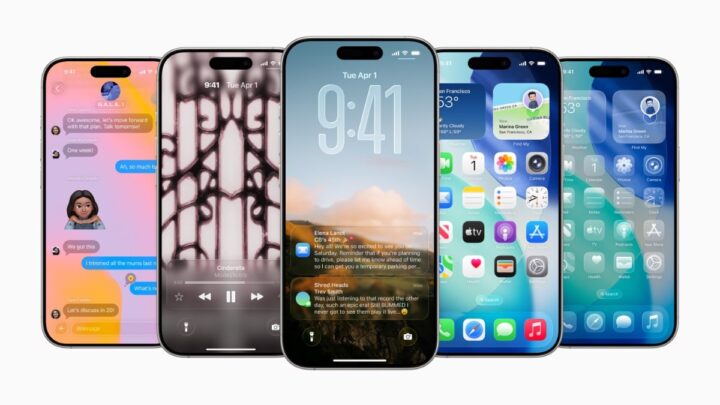
Apple is reportedly planning a focused refresh in iOS 27 that’s less about flashy features and more about fixing the wires under the hood. The company aims to remove legacy code, streamline interfaces, and subtly refresh older apps — changes that may translate into better battery life, fewer bugs, and improved system stability.
Beyond performance, these engineering efforts have meaningful privacy and security implications. In this article we’ll examine how a leaner operating system can reduce risk, why AI and app changes matter for data exposure, and how using a VPN — including lightweight approaches from providers like Doppler VPN — can fit into a privacy-first, battery-conscious workflow.
What Apple is doing in iOS 27 (briefly)
Reports indicate iOS 27 will focus on three core areas:
- Removing obsolete or redundant code paths that accumulate over years of development.
- Making modest interface tweaks rather than sweeping UI redesigns.
- Updating older apps so they perform more efficiently on modern hardware.
Collectively, these actions target performance and stability. A smaller, cleaner codebase can mean fewer background processes, less CPU overhead, and therefore lower power consumption — all of which benefit battery life.
Why code cleanup helps battery life and security
Protect your privacy with Doppler VPN
3-day free trial. No registration. No logs.
Trimming software bloat isn't just about speed — it has direct effects on power and safety:
- Reduced background activity: Legacy services and compatibility layers can run in the background or trigger unnecessary wakeups. Eliminating these reduces CPU and network usage.
- Fewer bugs and regressions: Less code surface area typically means fewer places for errors to hide, lowering crash rates and unexpected battery drains.
- Smaller attack surface: Removing outdated APIs and components that are no longer needed diminishes the number of potential vulnerabilities that adversaries could exploit.
- Efficient resource management: Modernized app code and updated frameworks can take advantage of power-sipping hardware features and scheduled background tasks, improving overall efficiency.
For users, cleaner system behavior translates into longer daily runtimes and fewer mysterious battery spikes.
AI, Siri, and the hidden battery cost
iOS 27 is also expected to continue Apple’s push into AI-driven features, including improvements to Siri. AI capabilities can be split broadly into two approaches:
- On-device processing: Runs locally and avoids sending data to remote servers. This is better for privacy and can be more power-efficient on modern chips that include neural engines.
- Cloud processing: Offloads heavy compute to remote servers, which increases network activity and may consume extra battery due to transmission.
If Apple shifts heavier AI workloads to the cloud, users could see increased network and CPU usage — affecting battery life. Conversely, optimized on-device models can reduce both latency and power consumption while offering stronger privacy guarantees because data never leaves the device.
What this means for privacy
Code cleanup and app modernization also give developers and the OS team opportunities to adopt newer privacy-focused APIs and tighter permission models. Benefits include:
- Fewer background network calls from legacy code that might leak metadata.
- Reduced telemetry or diagnostic traffic if older logging systems are retired.
- Easier enforcement of fine-grained privacy controls as older compatibility hacks are removed.
Nonetheless, any new feature — especially AI or cloud-connected services — can introduce additional data flow. Users should remain vigilant about app permissions and network protections.
Why VPNs still matter — and how they affect battery life
A VPN encrypts network traffic and masks your IP address, which is vital for privacy on untrusted networks (public Wi‑Fi, airports, coffee shops). However, running a VPN can change battery dynamics:
- Extra processing: Encryption/decryption and routing add CPU work, which can increase power use.
- Persistent connections: A VPN that keeps an always-on tunnel may prevent deep sleep modes for networking hardware.
- Latency and routing: Longer paths to servers or busy endpoints can lead to more retransmits and energy use.
That said, you can use a VPN without a meaningful battery penalty by being intentional about configuration.
Practical tips to balance privacy and battery (VPN-focused)
To get the privacy benefits of a VPN while keeping battery impact low, consider these best practices:
- Use efficient VPN protocols: Modern protocols like WireGuard are designed to be lightweight and low-overhead compared with older options. (Doppler VPN supports efficient protocol choices to minimize power and latency.)
- Enable automatic VPN only on untrusted networks: Rather than running a tunnel continuously, configure your VPN to connect automatically when you join public Wi‑Fi.
- Use split tunneling: Route only the apps that need privacy through the VPN and let non-sensitive traffic go direct. This reduces encryption overhead and conserves power.
- Choose nearby servers: Shorter network paths reduce latency and retransmission, saving both battery and data.
- Disable idle background services: Pair OS-level settings (Background App Refresh, location permissions) with VPN rules to limit unnecessary wakeups.
- Monitor battery and network use: Check iOS battery reports and network activity to see which apps and services are consuming resources.
These adjustments let you keep your traffic private without needlessly draining your battery.
What to watch for when updating to iOS 27
When iOS 27 arrives, take a measured approach:
- Update apps: Keep apps updated so they benefit from the OS-level improvements and adopt modern privacy APIs.
- Review permissions: Major OS updates are a good time to audit app permissions and Background App Refresh settings.
- Reconfigure VPN settings: If you rely on a VPN, review automatic connection preferences, protocol options, and split-tunneling rules after the update.
- Test battery life: New system updates may require a few charge cycles for battery statistics to stabilize — measure before panicking.
Conclusion
A disciplined code cleanup in iOS 27 could deliver tangible battery improvements, fewer bugs, and a smaller attack surface. For privacy-conscious users, these changes are welcome — but they don't eliminate the need for deliberate network protections. A well-configured VPN remains a powerful tool to protect data in transit. By pairing Apple's system-level optimizations with smart VPN settings (like efficient protocols, automatic connections on untrusted Wi‑Fi, and split tunneling), you can enjoy both improved battery life and robust privacy.
If you use a VPN, review its options after the iOS 27 update and choose configurations that match your privacy needs and battery expectations. Thoughtful setup means you don’t have to trade off privacy for power.