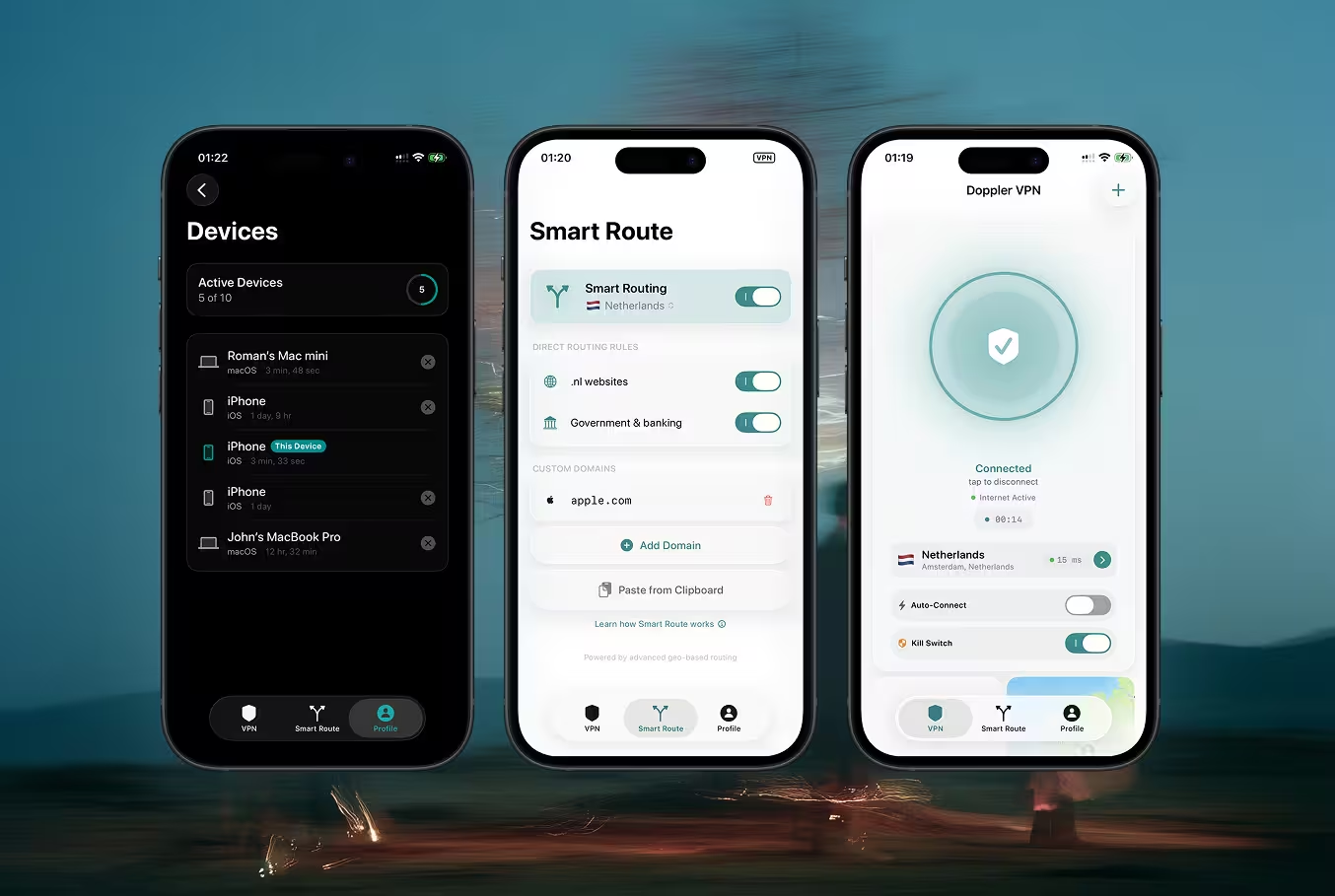
Doppler VPN for iPhone & iPad

Secure VPN with no registration. Download from the App Store. 3-day free trial included.

Download on the App Store

Why Doppler for iOS?

No Registration

Start using the VPN instantly — no email, no phone number, no account creation. Just download and connect.

VLESS-Reality Protocol

Next-generation encryption that disguises VPN traffic as regular HTTPS browsing. Undetectable by firewalls and DPI systems.

Built-in Ad Blocker

Block intrusive ads, trackers, and malicious domains at the DNS level. Faster browsing with less data usage.

Always-On VPN

Automatically reconnects when switching between Wi-Fi and cellular. Your connection stays protected 24/7.

Smart Routing

Intelligent server selection picks the fastest available node. Optimized for streaming, gaming, and daily browsing.

DNS Protection

Encrypted DNS queries prevent your ISP from seeing which websites you visit. Full DNS leak protection included.

How It Works on iOS

No account creation, no email, no phone number — just four simple steps.

1

Download from the App Store

Search for "Doppler VPN" or tap the link below. The download is free and the app is under 30 MB.

2

Open the App

Launch Doppler VPN. No sign-up screen, no registration form. The app is ready to use immediately.

3

Tap Connect

Press the connect button. Doppler automatically selects the best server and establishes a secure VLESS-Reality tunnel.

4

Browse Securely

That's it. Your traffic is encrypted, your IP is hidden, and ads are blocked. Use any app or website freely.

iOS-Specific Features

Built natively for Apple's ecosystem with deep system integration.

Network Extension (System-Level VPN)

Doppler uses Apple's Network Extension framework to operate as a true system-level VPN. All traffic from every app passes through the encrypted tunnel — not just browser traffic. This provides the same protection Apple requires for enterprise VPN solutions.

Always-On VPN

Enable Always-On mode and Doppler reconnects automatically whenever your connection drops. Switching from Wi-Fi to cellular? Waking your phone from sleep? The VPN re-establishes in under a second, so you're never exposed.

Per-App VPN Support

Choose which apps route through the VPN tunnel and which connect directly. Keep banking apps on your local network while protecting browsers and messaging apps through the VPN.

Home Screen Widget

Add the Doppler widget to your Home Screen or Lock Screen for instant connection status and one-tap toggle. See your current server, connection time, and protection status at a glance.

iPad Split View Support

Full support for iPad multitasking. Use Doppler VPN alongside other apps in Split View or Slide Over. The VPN status is always visible in the status bar regardless of which app is in the foreground.

Privacy on Apple Devices

Doppler complements what Apple already protects — and fills the gaps a VPN is designed for.

Apple leads the industry in device-level privacy — App Tracking Transparency, Mail Privacy Protection, and Safari's Intelligent Tracking Prevention. But there's a layer Apple can't protect: your network traffic.

What Apple Protects

  • App-level tracking (ATT prompts)
  • On-device data encryption (Secure Enclave)
  • Safari tracker blocking
  • Mail pixel tracking prevention

What Doppler VPN Adds

  • Hides your real IP address from every website and service
  • Encrypts all network traffic with VLESS-Reality (undetectable)
  • Blocks DNS-level tracking and ad domains
  • Prevents ISP traffic monitoring and throttling

Doppler uses device-based authentication — no accounts, no emails, no logs. We cannot identify you because we never collect identifying information in the first place.

System Requirements & Compatibility

Operating SystemiOS 16.0 or later
iPhoneiPhone 8 and later (all models with iOS 16 support)
iPadAll iPad models running iPadOS 16 or later
Mac (Apple Silicon)M1, M2, M3, M4 Macs via iPad app compatibility
App SizeUnder 30 MB
Battery ImpactMinimal — VLESS is a lightweight protocol with low CPU overhead
Data OverheadLess than 2% additional data usage compared to unencrypted browsing

Frequently Asked Questions

Does Doppler VPN offer a free trial on iOS?

Yes. Every new user gets a 3-day free trial with full access to all features. After the trial, choose a plan that works for you — monthly, 6-month, or annual.

Do I need to create an account?

No. Doppler uses device-based authentication. There is no registration, no email required, and no phone number needed. Just download and connect.

Does Doppler work in China, Russia, or Iran?

Yes. Doppler uses the VLESS-Reality protocol, which disguises VPN traffic as regular HTTPS. This makes it extremely difficult for censorship systems like the Great Firewall or TSPU to detect and block.

Will a VPN slow down my iPhone?

Barely noticeable. VLESS-Reality is one of the lightest VPN protocols available. Most users see less than 5% speed reduction. Battery impact is minimal thanks to efficient packet handling.

Does Doppler work with streaming apps?

Yes. Doppler's smart routing is optimized for streaming. The app automatically selects servers with the best performance for video content.

Can I use Doppler on my iPad and iPhone at the same time?

Yes. Your subscription works across multiple Apple devices. Each device gets its own secure connection.

Get Doppler VPN for iOS

No registration required. 3-day free trial. Connect in seconds.

Protect your browsing. Doppler VPN requires no registration and keeps zero logs. Try free for 3 days.