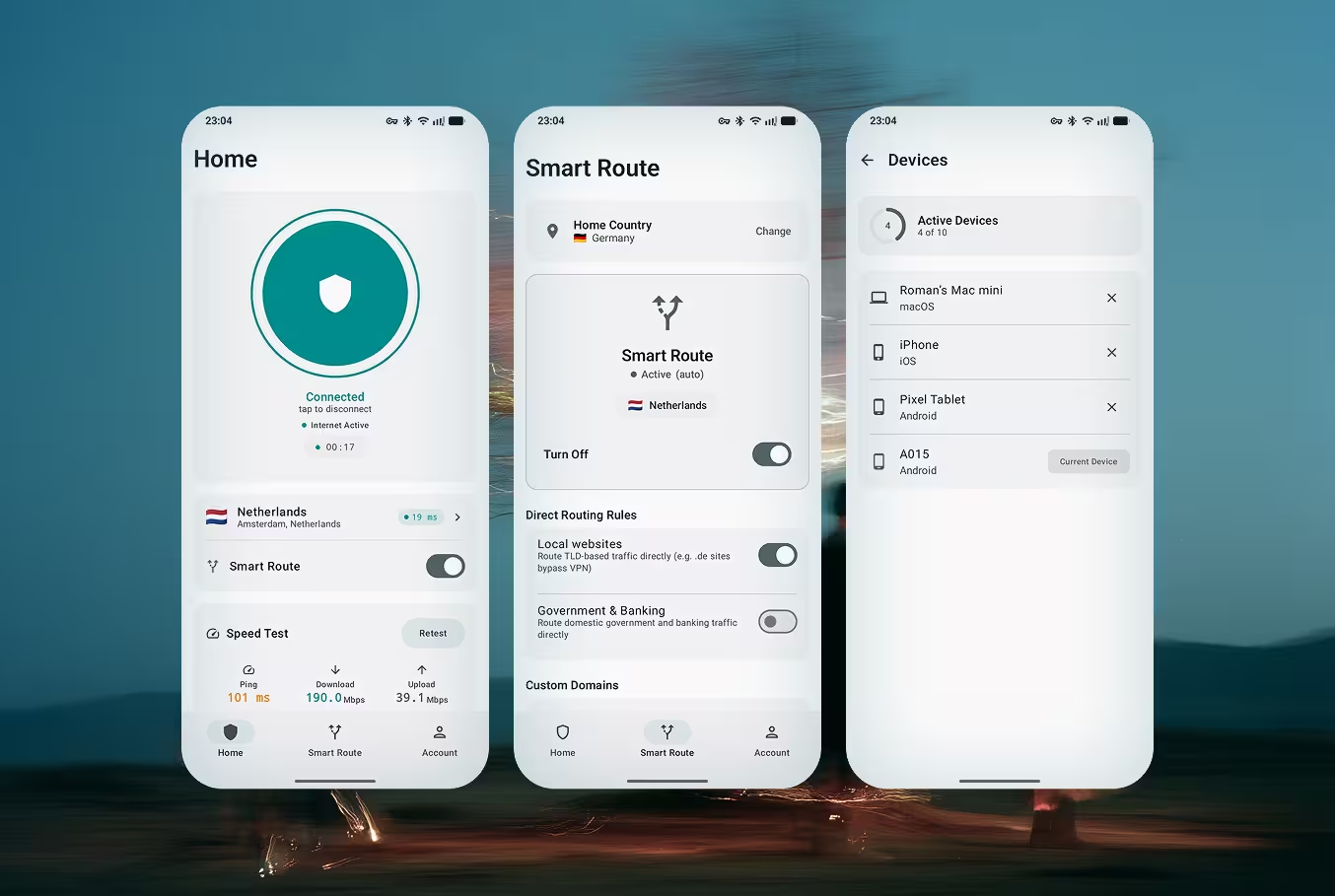
Doppler VPN for Android

VPN with no registration. No account, no email, no personal data. Available on Google Play and as APK. 3-day free trial included.

Why Doppler for Android?

Built specifically for Android users who need privacy without compromises. No sign-ups, no data collection, no limits.

No Registration

Open the app and connect instantly. No email, no phone number, no account creation. Your identity stays private from the very first tap.

VLESS-Reality Protocol

Military-grade encryption that makes your VPN traffic look like regular HTTPS browsing. Undetectable by DPI systems and government firewalls.

Built-in Ad Blocker

Block ads, trackers, and malicious domains at the DNS level. Faster browsing, less data usage, and better battery life on your Android device.

Always-On VPN

Uses Android's native Always-On VPN feature to ensure your connection is protected 24/7, even after reboot or network changes.

APK Sideloading

Can't access Google Play? Download the APK directly and install it manually. Perfect for users in Russia, Iran, China, and other censored regions.

DNS Protection

All DNS queries are encrypted and routed through secure servers. Prevents DNS leaks and stops your ISP from seeing which websites you visit.

Two Ways to Install

Choose the installation method that works best for your situation. Both give you the same full-featured VPN experience.

Google Play Store

Recommended
  • One-tap install, automatic updates
  • Verified by Google Play Protect
  • Seamless subscription management
Get it on Google Play

Direct APK Download

For Restricted Regions
  • Works where Google Play is blocked
  • No Google account required
  • Same features as the Play Store version

Ideal for users in Russia, Iran, China, and other countries where the Google Play Store is restricted or VPN apps are removed from the store.

Get APK via Telegram Bot

How It Works on Android

From download to secure browsing in under 30 seconds. No account, no email, no setup wizard.

1

Download the App

Install Doppler VPN from Google Play or download the APK directly. The app is lightweight — under 15 MB.

2

Open the App

Launch Doppler VPN. No registration screen, no sign-up form. The app is ready to use immediately.

3

Tap Connect

Press the connect button. Doppler automatically selects the fastest available server and establishes a VLESS-Reality tunnel.

4

Browse Freely

Your connection is now encrypted and undetectable. Access any website, app, or service without restrictions.

Android-Specific Features

Doppler VPN takes full advantage of Android's capabilities to provide the most secure and seamless experience.

Always-On VPN

Enable Android's built-in Always-On VPN setting to keep Doppler connected at all times. Go to Settings > Network & Internet > VPN > Doppler VPN > toggle Always-on. Your device will automatically reconnect after reboots or network changes.

Split Tunneling

Choose which apps go through the VPN and which use your regular connection. Route banking apps directly while keeping browsers protected. Configure per-app VPN rules in Doppler's settings.

Quick Settings Tile

Add Doppler VPN to your Android Quick Settings panel. Connect or disconnect with a single swipe and tap — no need to open the app. Available on Android 8.0 and above.

Battery Optimization

Doppler uses minimal battery. For the best Always-On experience, exclude Doppler from Android's battery optimization: Settings > Apps > Doppler VPN > Battery > Unrestricted. This prevents Android from killing the VPN connection in the background.

Android TV Support

Sideload the Doppler VPN APK on your Android TV or TV box to protect your streaming traffic. Access geo-restricted content on the big screen with the same VLESS-Reality encryption.

APK Sideloading Guide

For Censored Regions

If you're in a country where Google Play is restricted or VPN apps have been removed from the store, you can install Doppler VPN directly from the APK file. Follow these steps carefully.

1

Enable Unknown Sources

Go to Settings > Apps > Special app access > Install unknown apps. Select your browser or file manager and toggle 'Allow from this source'.

2

Download the APK

Get the latest Doppler VPN APK from our official Telegram bot @dopplercreatebot. This ensures you always get the authentic, unmodified file.

3

Install the APK

Open the downloaded .apk file and tap 'Install'. Android may show a warning about unknown apps — this is normal for sideloaded applications.

4

Verify and Connect

Open Doppler VPN and verify the app works correctly. The app should connect without requiring any account or registration — just tap connect.

Security Note

Only download the Doppler VPN APK from our official Telegram bot (@dopplercreatebot) or the official website (www.dopplervpn.org). Never install APK files from third-party sources — they may contain malware or modified code.

System Requirements

Operating System

Android 8.0 (Oreo) or higher

Battery Impact

Minimal — less than 2% additional battery drain with Always-On VPN enabled

Storage

Less than 15 MB app size, under 5 MB RAM usage when connected

Permissions Required

VPN connection permission only — no access to contacts, photos, or files

Compatible Devices

SamsungXiaomiHuaweiOnePlusGoogle PixelOPPORealme

Get Doppler VPN for Android Now

Private and undetectable. No registration, no account, no data collection. 3-day free trial. Download from Google Play or get the APK for restricted regions.

Protect your browsing. Doppler VPN requires no registration and keeps zero logs. Try free for 3 days.